 Chala Gist
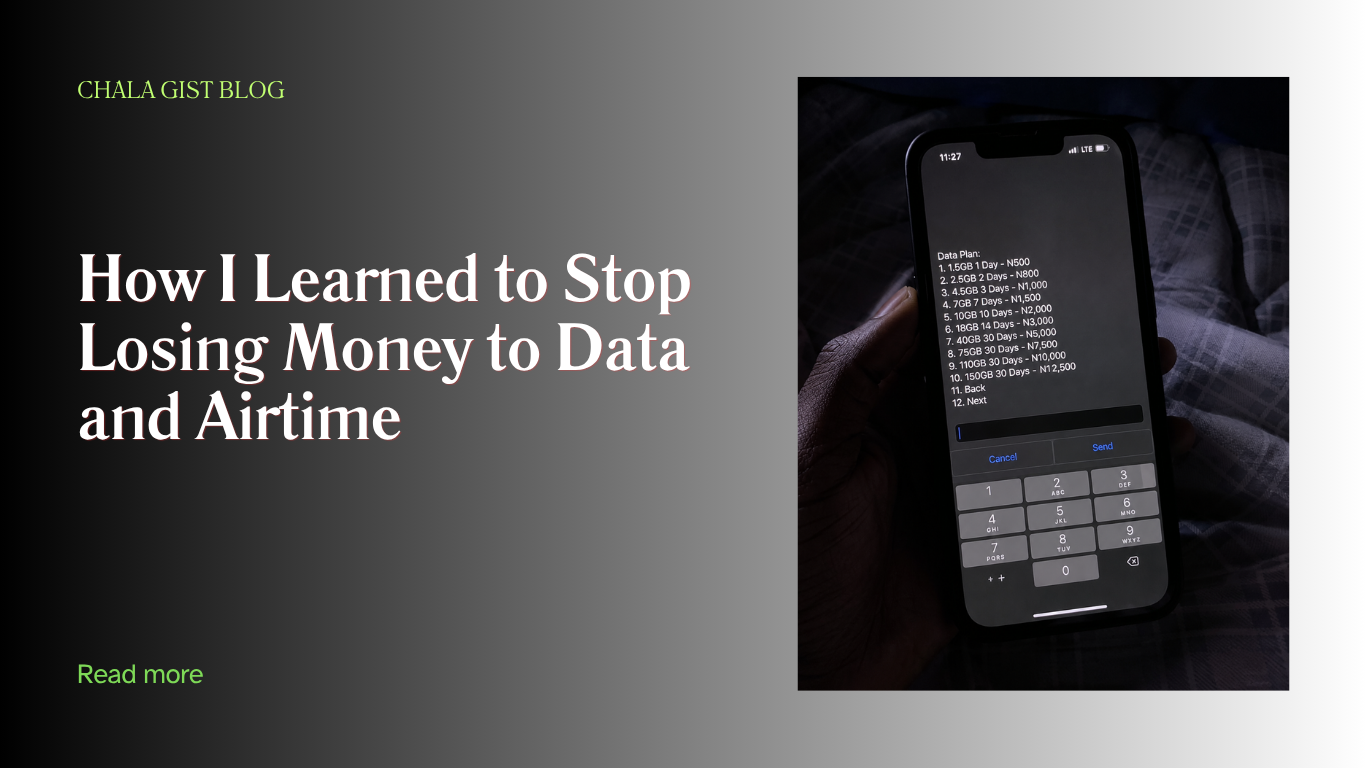
I still remember the exact day I got tired of it. It was a Sunday night, two days to a test, and my data finished right in the middle of downloading a past question PDF my coursemate sent to our class group. Not because I was streaming anything or doing something fancy — just WhatsApp, one Google search, and one PDF. I had to run to the corner shop by my hostel gate at almost 10pm just to buy a ₦200 recharge card so I could load a small data plan and finish downloading before the network vendor closed for the night. That was the day I stopped seeing data as “just data” and started treating it like the real bill it is.
If you’re a Nigerian student reading this, you already know the wahala. Data doesn’t finish because you’re careless. It finishes because everything — your portal, your group chats, your assignments, your side hustle, even your relationship — now runs through your phone. And after the February 2025 tariff hike pushed data and call rates up across MTN, Airtel, Glo, and 9mobile, a lot of us had to relearn how to spend on connectivity without losing our whole allowance to it.
This isn’t a “generic 10 tips” post copied from somewhere. This is what I actually changed about how I buy and use data and airtime, broken down network by network, habit by habit, so you can start saving from today.
Why Nigerian Students Spend So Much on Data (It’s Not Just You)
Before the hacks, let’s be honest about why this problem hit students harder than almost anyone else.
- Everything moved online. Lecture slides on Google Classroom, assignments on portals, group project files on WhatsApp and Google Drive — you’re not choosing to use data, school is forcing your hand.
- The 2025 tariff increase is still with us. The Nigerian Communications Commission approved a roughly 50% price increase for telecom operators, and all four major networks adjusted their rates. A plan that used to cost ₦1,000 for around 1.5GB now sits closer to ₦1,500 for 2GB, depending on the network and bundle size. Those new prices are still what we’re paying in 2026.
- Apps are heavier than they used to be. Instagram Reels, TikTok, and even WhatsApp status videos autoplay and eat data before you even realize it.
- We don’t compare plans — we just “buy data.” Most students dial one code out of habit and never check if another network, another bundle size, or another time of day would save them money.
Once I understood this, the fix stopped being “use less data” (which is unrealistic for a student) and became “spend smarter on the data I actually need.”
Step 1: Stop Buying Small Data Plans — Buy Big, Buy Rarely
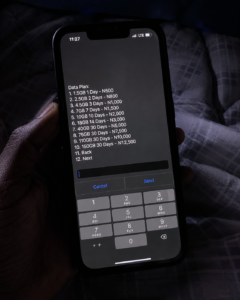
This was my biggest money leak. I used to buy ₦500 here, ₦300 there, whenever I felt data was finishing. That “small small” buying pattern is the most expensive way to use data in Nigeria, because the price per gigabyte drops sharply as the bundle size goes up.
Here’s a rough comparison of what your money buys at different price points across networks (prices change often, so always confirm the current rate by dialing the USSD code before you commit):
| Price | What You’d Typically Get | Cost per GB (approx.) |
|---|---|---|
| ₦500 | 1 – 1.5GB (short validity, e.g. 1–7 days) | ₦330 – ₦500/GB |
| ₦1,000 | 2 – 3.9GB depending on network | ₦250 – ₦500/GB |
| ₦2,000 – ₦2,500 | 6 – 8GB | ₦250 – ₦330/GB |
| ₦5,000 | 20 – 36GB depending on network | ₦140 – ₦250/GB |
On my line, I noticed that buying ₦500 worth of data almost every two days was actually costing me more by the end of the month than if I had just saved up and bought one ₦2,500 bundle at once. The maths didn’t add up until I started tracking it properly.
The pattern is simple: the bigger the bundle, the cheaper each gigabyte becomes. So instead of buying ₦300 three times in a week (₦900 total), I now save up and buy one bigger plan that gives me more data for less. If your allowance timing doesn’t allow that, at least try to buy weekly instead of daily — daily plans are almost always the worst value per gigabyte.
My rule now: if I can’t afford the bigger bundle this week, I’d rather manage what I have with data-saving settings (coming up below) than keep “topping up small small,” because that habit alone was costing me an extra ₦1,500 to ₦2,000 a month that I didn’t need to spend.
Step 2: Know Which Network Actually Fits Your Usage
I used to think all networks were basically the same. They’re not, and picking based on what your coursemates use (instead of what you actually do online) is another silent money leak.
- Glo generally gives the most data per naira on its bigger bundles, which makes it a solid pick if you’re mostly downloading course materials, backing up files, or don’t need rock-solid speed everywhere on campus. The trade-off is that Glo’s network can be inconsistent outside major cities.
- MTN has the widest coverage across Nigeria, so if your school or hostel is in an area with patchy network, MTN is usually the safer bet even though you pay slightly more for it.
- Airtel competes closely with MTN on speed, especially in cities, and its SmartTRYBE plan (you migrate to it for free) unlocks some of the cheapest night data available on any network in Nigeria.
- 9mobile can be genuinely cheap for light users, but coverage is the weakest of the four, so test it in your specific area before committing your main line to it.
You don’t have to marry one network. I now run two SIMs myself: MTN as my main line because it’s the only one that gives me full bars inside my room (my hostel is a bit far from the main road, so signal can be terrible), and Glo purely for buying bigger data bundles whenever I need to download something heavy, since it stretches further for the same naira. Dual-SIM phones are common enough now that this costs nothing extra beyond the SIM registration.
Step 3: Use Night Plans for Anything That Isn’t Urgent
This is the single biggest hack I wish someone had told me in my first year. Night data plans let you buy data at a fraction of the daytime price, valid only during specific late-night to early-morning hours (commonly around midnight to 5am or 11pm to 6am, depending on the network).
- Airtel’s night plan (available after you migrate to SmartTRYBE) has offered as little as ₦25 for 250MB.
- MTN and Glo also run their own night bundles at similarly steep discounts compared to daytime pricing.
I now schedule anything that isn’t urgent — downloading lecture videos, updating apps, backing up photos, downloading music or movies for the weekend — to happen between the time I go to bed and the time I wake up. The first time I tried it, I set my phone to download three lecture recordings and update all my apps before I slept, and I woke up to see everything done, all for under ₦100. You do need to actually be asleep (or set your phone to auto-download) for this to work without disrupting your night, but for a student who’s already sleeping through those hours anyway, it’s close to free data.
How I use it: I check what I need before bed, queue the downloads, plug in my phone, and wake up with everything I need without touching my daytime bundle at all.
Step 4: Fix Your Phone Settings — This Alone Can Cut Usage by Half
Before you even think about buying more data, your phone is probably wasting a chunk of what you already have. This takes about five minutes to fix and it’s permanent.
- Turn on Data Saver. On Android: Settings > Network & Internet > Data Saver. On iPhone: Settings > Cellular/Mobile Data > Mobile Data Options > Low Data Mode. This stops apps from using data quietly in the background — the exact thing that used to finish my data while I wasn’t even actively using my phone.
- Turn off video autoplay. Go into WhatsApp, Instagram, Facebook, and Twitter/X settings individually and switch autoplay to “Wi-Fi only” or off completely. Status and Reels videos that autoplay are one of the quietest data killers on a student’s phone.
- Switch streaming apps to their lowest quality setting. YouTube, Spotify, and any music or video app have a data-saving or lower-quality mode buried in settings. Use it when you’re on mobile data, and only switch to HD when you’re on Wi-Fi.
- Use lite versions of apps. Facebook Lite, Messenger Lite, and Opera Mini are built specifically to use far less data than their full versions, while still doing 90% of what you need.
- Disable auto-updates on mobile data. Play Store and App Store updates should only happen on Wi-Fi — go into their settings and force this.
- Set a data limit and warning. Your phone can literally cut off mobile data once you hit a number you set yourself, so you never get that heartbreak of checking your balance and seeing ₦0 left.
I did all six of these in one sitting on a Saturday afternoon, and genuinely noticed my data lasting almost twice as long the following week, with zero change in how I actually used my phone. My roommate thought I had started buying bigger data plans, but I was still on the same ₦1,000 bundle — I had just stopped wasting it.
Step 5: Use Campus and Public Wi-Fi Aggressively (But Safely)
If your school has a library, ICT center, faculty building, or hostel common area with Wi-Fi, that should be your default for anything heavy — downloading course materials, submitting large assignments, streaming a long video for a project, or updating apps.
A few things I learned the hard way about public/campus Wi-Fi:
- Avoid logging into your bank app or entering sensitive passwords on open, unsecured networks where possible.
- Download what you need and disconnect rather than staying logged in for hours; shared networks slow down fast once too many students pile on.
- If your school runs a subsidized or free student Wi-Fi scheme, register for it early in the semester — spots or bandwidth allocation sometimes run out once demand goes up close to exams.
I make it a habit to carry my laptop to the library at least twice a week now, not just to read, but to use that time to download anything heavy — recorded lectures, project files, even software updates — that I’ve been holding back on because of data.
Step 6: Rethink How You Spend on Airtime, Not Just Data
Airtime hacks matter just as much, especially since most of us now use airtime almost entirely to buy data rather than to actually call people.
- Check your tariff plan. Networks have “youth” or lower-rate tariff plans (like Airtel’s SmartTRYBE) that you migrate to for free and that come with cheaper per-second call rates plus bonus data and night plan access. If you’ve never migrated your line, you’re likely still on an older, more expensive default plan.
- Use call/data gifting instead of buying separately for a friend. All four networks let you gift airtime or data directly to another line on the same network (MTN, Airtel, Glo, and 9mobile all have their own gifting codes). My roommate and I do this often — whoever has credit at the time gifts the other, and we settle up later. It saves us both from unnecessary bank transfer charges for small amounts.
- Be careful with “airtime to cash” platforms. These let you convert unused airtime into money in your bank account, but most charge a noticeable percentage as a fee, so only use them for airtime you genuinely won’t spend — not as a regular habit.
- Buy airtime and data through your bank app or a trusted vendor app instead of recharge cards where possible. Recharge cards sometimes come with scratched-off PINs or vendor markups, while banking apps and vendor apps often run small cashback or discount promos on top of the standard price.
- Watch out for “bonus” airtime. Some promotional airtime you receive can’t actually be used to buy data — only your main balance counts. Dial your network’s balance-check code to confirm what’s real, spendable airtime before you try to use it for a data bundle.
Step 7: Consider Data Reselling as a Side Income (Not Just a Saving Hack)
Once you understand how bulk data pricing works, you start to realize something: the same wholesale rates that make big bundles cheap for you can also become a small income stream. A number of students register as vendors on data-reselling platforms, fund a wallet, and buy data at a discount to use for themselves while also selling small amounts to coursemates who don’t want to deal with USSD codes or don’t have the cash to buy big bundles upfront. It’s not going to replace your allowance, but it’s a realistic way to make your own data cost close to nothing while helping out roommates who always seem to be asking “abeg share your hotspot.”
I registered on one of these platforms last semester mainly to get cheaper data for myself, and I ended up making a small extra income from classmates who preferred to buy small bundles from me instead of queuing to buy from the network directly. It’s not much, but it covers my own data cost most weeks.
If this interests you, check out my post on student side hustles — data reselling is one of the easier ones to start with almost no capital.
My Actual Monthly Data and Airtime Routine Now
To put all of this together, here’s what my routine actually looks like these days:
- I buy one bigger data bundle at the start of the week or month instead of several small ones.
- Data Saver, autoplay-off, and low-quality streaming settings stay on permanently.
- Anything non-urgent (downloads, updates, backups) happens on a night plan or on campus Wi-Fi.
- I check my balance and tariff plan once a month to make sure I’m still on the cheapest option available to me.
- I keep a second SIM strictly for backup, on whichever network has better signal in my hostel that semester.
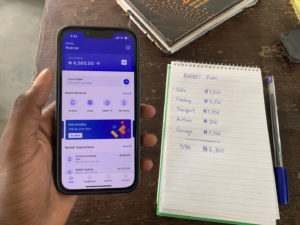
This single shift took my average monthly spend on data and airtime from around ₦5,500 down to closer to ₦3,000 — real money that now goes toward feeding instead.
Frequently Asked Questions
Which Nigerian network gives the most data for the least money? Glo generally offers the most data per naira on its bigger bundles, but MTN has the widest and most reliable coverage, and Airtel tends to win on speed, especially in cities. The “cheapest” answer depends on which one actually works well where you live and school.
Is it better to buy data daily, weekly, or monthly as a student? Monthly or weekly bundles almost always give you more data per naira than daily plans. If your allowance timing makes bigger purchases hard, weekly is a good middle ground between saving money and staying within a tight budget.
How do night data plans work, and are they worth it? Night plans give you heavily discounted data valid only during specific late-night hours, often between midnight and 5 or 6am. They’re worth it if you can schedule downloads, updates, or backups for while you sleep — it’s some of the cheapest data available on any Nigerian network.
Does turning on Data Saver actually make a noticeable difference? Yes. Data Saver blocks apps from using data quietly in the background, which is often where a large chunk of “mysteriously finished” data disappears to, even when you feel like you barely used your phone that day.
Can I really convert unused airtime into cash? Yes, several platforms let you convert airtime balance into money sent to your bank account, but most take a percentage fee, so it only makes sense for airtime you genuinely have no use for — not as a routine way to get cash.
MORE TO CHECK OUT:
- How to Organize a Nigerian Hostel Room on a Small Budget
- DIY Reading Table for Under ₦10k: How I Built Mine in a Weekend
- How I Fixed My Leaking Tap in My Hostel Room Without Calling a Plumber
- How to Decorate a Small Hostel or Lodge Room Without Spending Much As a Student
- How to Make Your Room Smell Good and Stay Clean With Limited Space
- How to Deal With NEPA (Power) Outages as a Student
-
DIY Mosquito-Proofing Your Room: How I Stopped Fighting Mosquitoes Every Night in My Hostel
-
How to Soundproof a Thin Hostel Wall Cheaply (Without Wahala or Wasting Money)
-
How to Budget Your Semester Allowance as a Nigerian Student (To Avoid Borrowing From Loan Apps)
-
10 Cheap Foodstuff Combos That Actually Fill You Up on Campus (2026 Guide)
-
How to Cook Without a Kitchen: Hostel-Friendly Meals With One Burner

 Chala Gist